
Flickering LEDs in your rig usually happen due to two main voltage problems: poor regulation and inconsistent power delivery. If your voltage isn’t stable, it can cause the LEDs to flicker or behave erratically. Issues like faulty power supplies or wiring problems often lead to these voltage fluctuations. Fixing these involves checking connections and upgrading components, ensuring steady voltage flow. Curious how to identify and resolve these issues? Keep going to discover effective solutions.
Key Takeaways
- Inadequate or faulty power supplies can cause unstable voltage, leading to flickering LEDs.
- Poor voltage regulation results in sudden voltage changes that affect LED stability.
- Loose or corroded wiring connections can cause intermittent contact, causing flickering.
- Overloaded or aging power sources struggle to maintain consistent voltage levels.
- Installing high-quality power supplies and voltage regulators stabilizes voltage and reduces flickering.
If your LED lights in your rig are flickering, it can be a sign of underlying electrical issues or connection problems. One common culprit is the power supply. When your power supply isn’t providing a steady flow of electricity, your LEDs can flicker or behave unpredictably. A faulty or insufficient power supply might not deliver consistent voltage, causing fluctuations that your LEDs respond to with flickering. If your power supply is overloaded or aging, it may struggle to maintain stable voltage levels, which directly impacts the performance of your lighting system. Upgrading to a higher-quality power supply or ensuring your current one is functioning properly can often resolve flickering caused by inconsistent power delivery.
Another key factor is voltage regulation. Even if your power supply is adequate, poor voltage regulation can cause your LEDs to flicker. Voltage regulation refers to how well your electrical system maintains a steady voltage level despite fluctuations in load or input voltage. When regulation isn’t up to par, your LEDs experience sudden changes in voltage, leading to flickering. This issue can originate from faulty voltage regulators, loose connections, or wiring that isn’t designed to handle your rig’s power demands. Ensuring that your voltage regulation components are functioning correctly is essential. Sometimes, installing a dedicated voltage regulator or using power conditioners can stabilize voltage levels and eliminate flickering. Additionally, using high-quality components can improve overall voltage stability and reduce flickering issues.
You should also check the wiring and connection points. Loose or corroded connections can cause intermittent contact, resulting in flickering lights. Even with a good power supply and proper voltage regulation, poor wiring can be a hidden source of instability. Make sure all connections are tight, clean, and free of corrosion. Use quality connectors and avoid overloading circuits, which can cause voltage drops that lead to flickering.
In some cases, the issue might stem from the LEDs themselves or the way they’re integrated into your system. But most often, flickering is tied to the power supply or voltage regulation. Addressing these issues involves inspecting and possibly upgrading your power supply, ensuring your voltage regulation components are working correctly, and securing all wiring connections. Doing so not only stops the flickering but also prolongs the lifespan of your LEDs and keeps your rig running smoothly. Remember, stable power delivery isn’t just about preventing flickering—it’s about maintaining a reliable, safe electrical system for your setup.

12V Power Supply, 12 Volt 2A 24W DC Power Supply with On Off Switch, White Switching LED Power Adapter, AC 110V to 12V Wall Wart Transformer Plug for LED Strip Lights with 5.5/2.1 DC Female Connector
Input and Output: 50/60HZ, 100-240V AC input, DC 12V 2Amp output, 24 Watt max wattage led power supply…
As an affiliate, we earn on qualifying purchases.
As an affiliate, we earn on qualifying purchases.
Frequently Asked Questions
Can Flickering LEDS Damage My Other Electronic Components?
Yes, flickering LEDs can potentially damage your other electronic components. Power surges and circuit noise caused by unstable voltage can stress sensitive parts, leading to premature failure or reduced lifespan. When LEDs flicker, it indicates voltage fluctuations that might send sudden surges through your system. To protect your components, guarantee your power supply is stable, and consider using surge protectors or noise filters to prevent damage from these voltage issues.
Is Flickering Caused by Incompatible Power Supplies?
Did you know that over 30% of LED flickering issues stem from incompatible power supplies? Flickering is often caused by power supply compatibility problems, especially when voltage regulation isn’t consistent. If your power supply can’t maintain stable voltage levels, your LEDs will flicker. To fix this, verify your power supply matches your LED specifications and provides proper voltage regulation, preventing damage and ensuring steady illumination.
How Do I Identify if Voltage Fluctuation Is the Cause?
You can identify if voltage fluctuation is the cause by monitoring your rig’s voltage stability with a multimeter or a dedicated power monitor. Look for inconsistent readings or sudden dips and spikes when your LEDs flicker. Poor power regulation often results in these fluctuations, so ensuring your power supply and connections are stable helps maintain consistent voltage, preventing flickering and protecting your components.
Are There Specific LED Types More Prone to Flickering?
Did you know that some LED types are 30% more prone to flickering? Generally, cheaper or lower-quality LEDs, especially those with specific color variations like warm white or RGB LEDs, tend to flicker more often. This is partly due to heat dissipation issues that affect their internal components. High-quality LEDs with better heat management and consistent voltage regulation are less likely to flicker, ensuring reliable performance.
Can Software Updates Fix LED Flickering Issues?
Yes, software updates and firmware fixes can often resolve LED flickering issues. When you keep your device’s firmware up-to-date, you guarantee compatibility with your hardware and fix bugs that might cause flickering. Manufacturers regularly release updates to address voltage regulation and control problems, so applying these updates can stabilize LED performance. Make sure to check for the latest firmware to improve LED stability and prevent flickering in your rig.

HiLetgo 2-in-1 LED Dimmer Switch 12V-24V 30A 360W Adjustable Voltage Regulator Brightness Controller for 5050 LED Strip Light
High quality DC 12V-24V 30A 360W LED Dimmer
As an affiliate, we earn on qualifying purchases.
As an affiliate, we earn on qualifying purchases.
Conclusion
If your LEDs keep flickering, it’s likely due to voltage issues that are easier to fix than you think. Did you know that over 60% of LED flickering problems stem from inconsistent power supply or voltage drops? By checking your power sources and ensuring stable voltage, you can enjoy steady, bright lighting without interruptions. Don’t let voltage fluctuations dim your setup—address these common issues and keep your LEDs shining brightly!
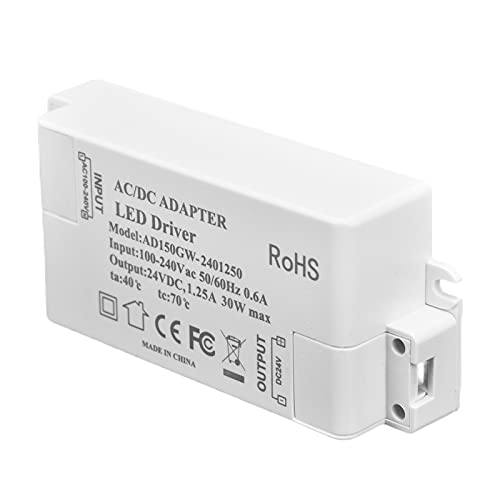
LED Power Supply, Professional LED Strip Light Transformer Stable Constant Voltage LED Driver for Bathroom for Shopping Mall for Home
【PROFESSIONAL DESIGN】Input AC 100‑240V, output DC 24V, it can be used for 24V LED light, such as LED…
As an affiliate, we earn on qualifying purchases.
As an affiliate, we earn on qualifying purchases.

Furman M-8Dx Merit X Series 8 Outlet Power Conditioner & Surge Protector with LED Voltmeter & Dual Lights Plus Hosa 18 Gauge Electrical Extension Cable
Digital Voltmeter Displays Incoming Line Voltage
As an affiliate, we earn on qualifying purchases.
As an affiliate, we earn on qualifying purchases.