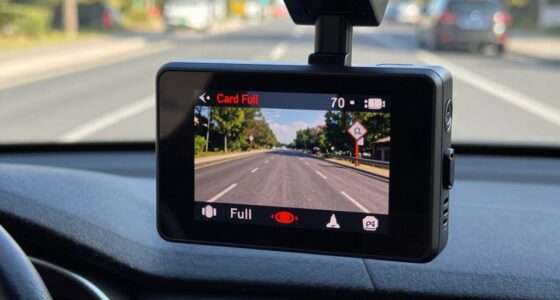
To calculate how long you can record your dash cam during parking mode without draining your battery, start by noting its current draw in milliamps (mA). Convert your car’s battery capacity, usually around 60Ah or 60,000mAh, and then divide the safe battery drain limit—typically half the capacity—by your dash cam’s power consumption to find the maximum recording time. Keep in mind other electrical loads and power-saving features; understanding these factors helps you extend your parking mode safely. If you want to learn more, continue exploring these calculations.
Key Takeaways
- Determine your dash cam’s current draw in milliamps (mA) from the specifications.
- Convert your vehicle’s battery capacity from amp-hours (Ah) to milliamp-hours (mAh) for calculations.
- Calculate maximum safe battery drain (usually 50% of the total capacity) to avoid affecting vehicle starting ability.
- Divide the safe battery drain by the dash cam’s current draw to estimate maximum parking mode recording time.
- Use power management features like motion detection and low-voltage cutoff to extend safe recording duration.

When you leave your vehicle parked with a dash cam in parking mode, it can sometimes drain your car’s battery more quickly than expected. This is because dash cams, especially when set to monitor continuously, draw power even when the engine is off. To prevent unexpected battery drain, understanding how much power your dash cam consumes and how to conserve the battery is essential. Battery conservation becomes a priority, especially if you park for extended periods or if your vehicle’s battery isn’t new or fully charged.
The key to managing this drain lies in understanding your dash cam’s power consumption. Most models specify their current draw in milliamps (mA), which directly impacts how long your battery can sustain the camera without risking a shutdown. For example, if your dash cam uses 200mA and your car’s battery is around 60 amp-hours (Ah), you can estimate the running time by dividing the total capacity by the power consumption. In this case, converting Ah to mA-hours (60,000mAh), you get approximately 300 hours of continuous operation before the battery is fully drained—assuming no other power draws. However, in reality, other vehicle systems draw power too, making this a theoretical maximum.
Understanding your dash cam’s current draw helps estimate how long your vehicle’s battery can power it safely.
To calculate how long you can record safely, you should also consider the minimum safe battery level for your vehicle. Most car batteries shouldn’t be discharged below 50% to ensure reliable starting and prevent damage. If your battery has a capacity of 60Ah, that means you should limit drain to about 30Ah for safe operation. Dividing this capacity by your dash cam’s power consumption gives a rough estimate of how long you can keep it recording in parking mode without risking battery failure. For a 200mA draw, this equates to roughly 150 hours; for higher power models, that time decreases.
Implementing power-saving features can extend this time. Many dash cams have parking mode settings that activate only when motion is detected or after a certain delay, reducing unnecessary drain. Additionally, connecting your dash cam to a hardwiring kit with a low-voltage cutoff can automatically turn it off when the battery drops to a certain level. This ensures you won’t wake up to a dead battery, providing peace of mind and protecting your vehicle’s electrical system.
Furthermore, understanding the typical Gold IRA Markets and the importance of managing asset longevity can help you optimize your dash cam’s energy consumption, similar to how investors manage their portfolio risks and resources effectively. In the end, calculating how long you can record safely in parking mode involves knowing your dash cam’s power consumption, your vehicle’s battery capacity, and the minimum safe battery level. By understanding these factors and taking steps to conserve power, you’re better equipped to use your dash cam effectively without risking a dead battery.
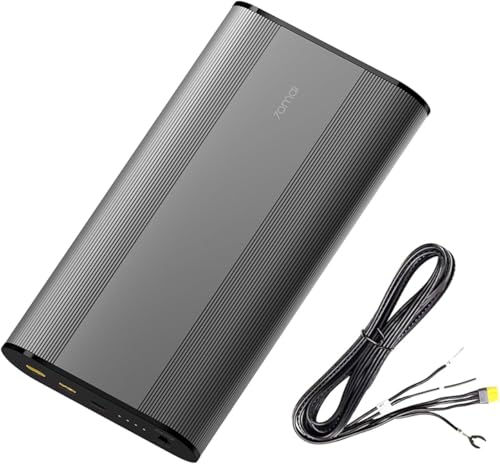
70mai Dash Cam Battery Pack BL96NNX, 96Wh LiFePO4 Backup Power, Up to 30-Hour Parking Mode, Low Voltage Protection, 11.2-30V Input, XT30+Type-C Output, 7-Protection BMS(Fuse Box Solution)
【Universal Dash Cam Compatibility】The XT30 output port simulates standard car battery signals (VCC/ACC/GND), while the included 3.3m Type-C…
As an affiliate, we earn on qualifying purchases.
As an affiliate, we earn on qualifying purchases.
Frequently Asked Questions
Can Parking Mode Drain My Car’s Battery Completely?
Yes, parking mode can drain your car’s battery completely if the power consumption exceeds your battery capacity. To avoid this, monitor your dash cam’s power usage and consider your battery’s capacity. If your dash cam draws a lot of power, it might drain faster, especially when the engine is off. Calculating how long it can record safely helps prevent a dead battery, ensuring your car starts when needed.
How Does Temperature Affect Parking Mode Battery Drain?
Temperature notably impacts your parking mode battery drain. Cold weather causes thermal effects that slow chemical reactions inside the battery, increasing drain and risking capacity loss over time. Conversely, high temperatures accelerate battery aging, reducing its lifespan and efficiency. To protect your dash cam’s battery, avoid extreme temperatures, and consider parking in shaded or heated areas. Proper temperature management ensures your parking mode functions reliably without unnecessary battery depletion.
Is It Safer to Turn off Parking Mode Overnight?
Yes, it’s safer to turn off parking mode overnight. This helps with battery management and prevents unnecessary drain, especially if you won’t need the dash cam’s surveillance. Turning it off also enhances power optimization, ensuring your vehicle’s battery stays healthy and ready for driving. If you want to keep it on, consider setting a timer or monitoring the drain closely to avoid risking a dead battery in the morning.
What’s the Best Way to Monitor Battery Health During Parking?
To monitor your battery health during parking, you should use built-in battery monitoring tools or install a dedicated voltage monitor. Regularly check the voltage levels to guarantee they stay within safe limits. Employ effective power management by turning off unnecessary features and adjusting recording settings to prevent overdraining the battery. This proactive approach helps you avoid unexpected shutdowns and prolongs your dash cam’s lifespan, keeping your vehicle protected.
Do Different Dash Cam Models Have Varying Power Consumption Rates?
Yes, different dash cam models have varying power consumption rates due to their design and features. Some models with higher dash cam capacity or advanced features like GPS or night vision tend to use more power, draining your battery faster during parking mode. To guarantee safe recording, check each model’s power consumption rates and compare them to your battery’s capacity, helping you determine how long you can record without risking battery drain.

galphi 4K Dash Cam Front, Built-in 5G WiFi, 64GB Card Included, Dash Camera for Cars, Mini Dashcam with Super Night Vision, Loop Recording, G-Sensor, 24 Hours Parking Monitor, Support 256GB Max
【4K 2160P Resolution Dash Cam】Capture every drive in stunning 4K UHD resolution with the Galphi front dash cam,…
As an affiliate, we earn on qualifying purchases.
As an affiliate, we earn on qualifying purchases.
Conclusion
Just like a hero guarding their treasure, knowing your dash cam’s battery drain helps you safeguard your parked peace. By calculating your power reserve, you ensure your camera’s watchful eye stays active without risking a dead battery. Remember, it’s a delicate dance—balance your recording needs with your car’s heartbeat. Stay vigilant, plan ahead, and let your dash cam be the silent guardian, ever-ready, like a guardian angel watching over your parked moments.

TERUNSOUl 4K+4K Dash Cam Front and Rear, Free 128GB Card Included, 5.8GHz WiFi Dash Camera for Cars, Built-in GPS, G-Sensor, 170°Wide Angle, 3" IPS Screen, 24H Parking Mode, Support 512GB Max
Ultra HD 4K Front + 4K Rear Recording: The Terunsoul dash cam supports dual-channel simultaneous recording, capturing both…
As an affiliate, we earn on qualifying purchases.
As an affiliate, we earn on qualifying purchases.

Vantrue New N4S 3 Channel Dash Cam, Front Rear Inside 2.7K+1440P+1440P Dashcam for Cars, Front and Rear Dual Channel, PlatePix™ Tech, STARVIS 2 Night Vision, Parking Mode, Wi-Fi, Support 1TB (RC18)
[ 2026 New 3-Channel Dash Cam & 360°Coverage ] Equipped with triple STARVIS 2-powered sensors, the Vantrue N4S…
As an affiliate, we earn on qualifying purchases.
As an affiliate, we earn on qualifying purchases.