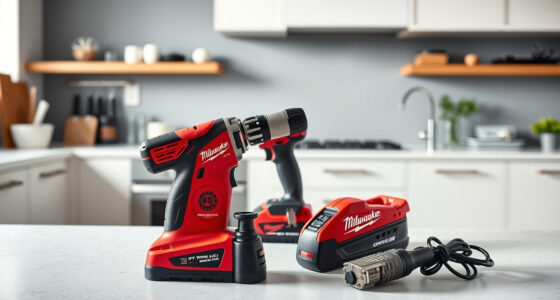

If your Milwaukee power tools charger is blinking red, it indicates an issue that needs attention. A blinking red light can signal various problems, from battery issues to charger faults. This guide walks you through practical, safe troubleshooting steps to resolve the problem quickly and get your tools back to work.

Get business pricing on garage and car supplies
- Business-only prices and quantity discounts
- Tax-exempt purchasing
- Multiple users, one account, clear invoices
Key Takeaways
| Identify the blinking pattern | Different blinking sequences indicate specific issues. |
| Check the battery condition | Ensure batteries are properly seated and not damaged. |
| Inspect the charger and connections | Look for damaged cables or dirt on contacts. |
| Use recommended batteries | Use Milwaukee batteries compatible with your charger model. |
| Follow safety precautions | Always unplug and handle batteries carefully during troubleshooting. |
Step 1: Observe the Blinking Pattern
Note the specific blinking pattern of the red light. A single blink, fast blinking, or slow blinking can indicate different issues. Refer to your charger’s manual or Milwaukee’s support resources for pattern meanings.
Step 2: Ensure Proper Battery Seating
- Remove the battery from the charger.
- Inspect the battery terminals for dirt or damage.
- Reinsert the battery firmly into the charger, ensuring it clicks into place.
Step 3: Check the Battery Condition
If the battery is old, damaged, or not charging properly, consider replacing it with a high-capacity Milwaukee battery like the M18 5.0 Ah XC Resistant Battery or the HIGH Output XC 6.0Ah Battery Pack. Use a known good battery to test the charger.
Step 4: Inspect the Charger and Connections
- Unplug the charger from power.
- Check for any visible damage or dirt on the charging port and contacts.
- Clean contacts gently with a dry cloth if needed.
- Plug the charger back in and try charging again.
Step 5: Test with a Different Battery or Charger
If possible, test your batteries on another Milwaukee charger, or try a different battery on your current charger. This helps identify whether the issue lies with the battery or the charger itself.
The Products in This Guide
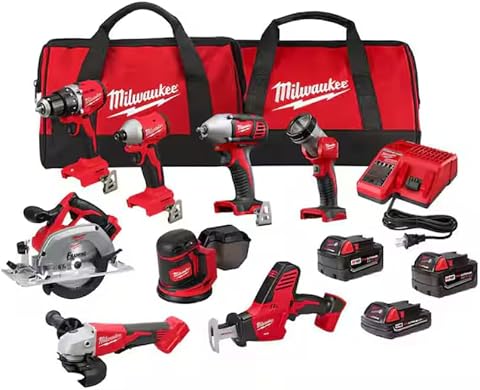
Milwaukee M18 18V Cordless Power Tool Combo Kit
- ✔ Voltage: 18V
- ✔ Number of Batteries: 3
- ✔ Tool Count: 8
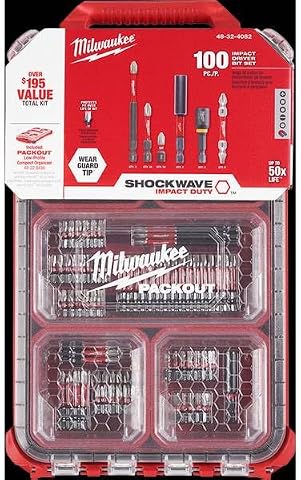
Milwaukee Shockwave 100pcs Impact Driver Bit Set Packout
- ✔ Pieces: 100
- ✔ Case: Packout
- ✔ Material: Impact steel
Milwaukee M18 18V Cordless Power Tool Combo Kit
<p>The Milwaukee M18 18V Cordless Power Tool Combo Kit offers a comprehensive set of tools and batteries, making it ideal for diverse tasks. The included charger is compatible with Milwaukee’s M18 system, but occasional blinking red lights can occur due to battery or connection issues.</p>
Pros:
- Includes 8 tools for versatile use
- 3 high-capacity batteries for extended runtime
- Durable storage with 2 tool bags
- Rapid charger minimizes downtime
Cons:
- Charger blinking red can be confusing
- Requires proper battery maintenance
- Potential for connection issues
Best for: Professionals and serious DIYers needing a full toolkit
Not ideal for: Users with only occasional light-duty projects
Bottom line: A versatile, complete power tool kit with reliable batteries and a charger, though occasional troubleshooting may be needed.
Milwaukee Shockwave 100pcs Impact Driver Bit Set Packout
<p>This 100-piece impact driver bit set enhances your Milwaukee toolkit, providing durable bits for various applications. It’s a great accessory if you’re troubleshooting your charger and need reliable bits for demolition or drilling tasks.</p>
Pros:
- Wide variety of bits
- Packout case for organization
- Durable impact-rated bits
- Compatible with M18 impact drivers
Cons:
- Bulkier case for storage
- Bits may wear with heavy use
- Not a standalone tool
Best for: Professional contractors and DIY enthusiasts needing impact bits
Not ideal for: Users seeking only basic drill bits
Bottom line: A comprehensive impact bit set that complements Milwaukee’s M18 impact drivers and drills.
Frequently Asked Questions
What does a blinking red light on my Milwaukee charger mean?
A blinking red light typically indicates a charging issue, such as a faulty connection, incompatible battery, or battery health problem. Refer to the blinking pattern for specific diagnostics.
Can I use any battery with my Milwaukee charger?
It’s best to use Milwaukee batteries designed for the M18 system. Using incompatible batteries may cause charging issues or damage the charger.
What safety precautions should I follow during troubleshooting?
Always unplug the charger before inspecting or cleaning. Handle batteries carefully, avoid exposing them to extreme temperatures, and wear safety glasses if needed.
How often should I replace my batteries?
Battery lifespan varies with usage. If you notice reduced runtime or frequent charging issues, consider replacing old batteries with new Milwaukee-compatible models.
Getting Your Milwaukee Charger Back in Action
By following these troubleshooting steps, you can identify and resolve common causes of blinking red lights on Milwaukee chargers. Remember to use high-quality, compatible batteries and keep your contacts clean. Regular maintenance and proper handling will ensure your tools and charger perform reliably for years to come.
Affiliate disclosure: As an Amazon Associate we earn from qualifying purchases. Prices and availability are accurate as of the time of publishing.
Halloween Picks
halloween
As an affiliate, we earn on qualifying purchases.