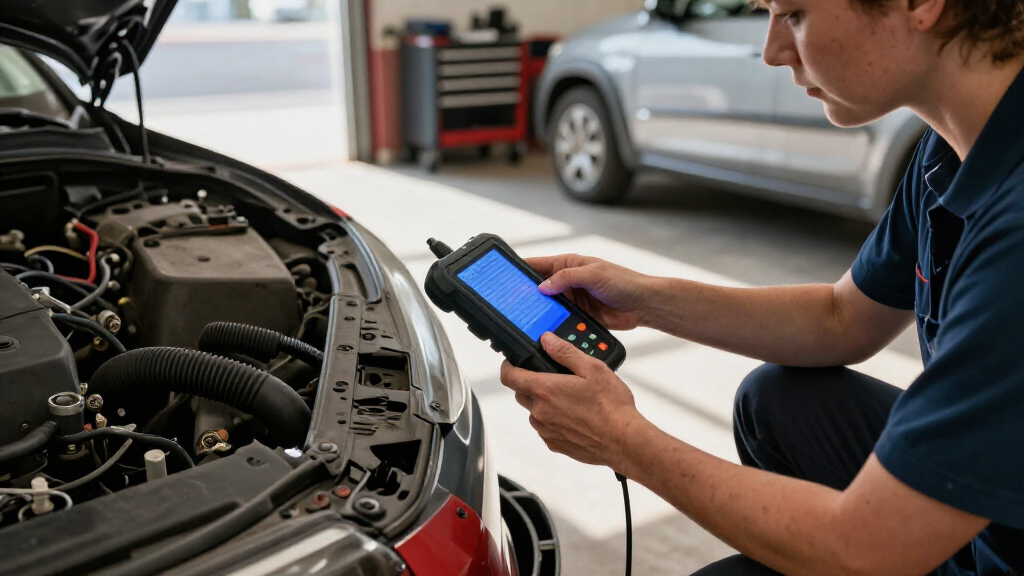

Choosing a car diagnostic scanner is mainly a choice between checking common engine faults cheaply and diagnosing a wider range of vehicle problems. A basic OBD-II code reader can retrieve and clear many powertrain codes, which suits owners who want a first clue when the check-engine light appears. A professional bidirectional scanner typically adds access to systems such as ABS and airbag modules, richer live data, and, on supported vehicles, tests that command components to operate. That broader coverage costs more and may require updates or subscriptions. Choose the basic reader for occasional engine-light checks; choose the professional scanner if you maintain several vehicles, need system-level diagnostics, or can make practical use of its advanced functions.

Get business pricing on garage and car supplies
- Business-only prices and quantity discounts
- Tax-exempt purchasing
- Multiple users, one account, clear invoices

Foxwell NT301 OBD2 Scanner – Live Data Diagnostic Code Reader
- ✔ Model: NT301
- ✔ Display: 2.8-inch color screen
- ✔ Supported protocols: KWP2000, J1850 VPW, ISO9141, J1850 PWM, CAN

ANCEL AD410 Enhanced OBD2 Scanner – Vehicle Code Reader for Check Engine Light (Black/Yellow)
- ✔ Model: AD410
- ✔ Display: 2.4-inch color screen
- ✔ Code database: More than 42,000 trouble-code definitions

ANCEL AD310 Classic Enhanced Universal OBD II Scanner – Black
- ✔ Model: AD310 Classic Enhanced
- ✔ Dimensions: 8.9 × 6.9 × 1.4 inches
- ✔ Weight: 12 ounces
At a Glance
| Criteria | Basic OBD-II code reader | Professional bidirectional diagnostic scanner | Winner |
|---|---|---|---|
| System coverage | Usually focused on OBD-II powertrain and emissions systems | Often covers powertrain plus supported ABS, airbag, transmission, and other modules | B |
| Code reading and clearing | Reads and clears many generic engine and emissions codes | May show manufacturer-specific codes and additional module details | B |
| Live data | Often shows a small set of standard sensor readings | Typically offers more parameters, graphs, and data recording | B |
| Active tests and service functions | Generally lacks bidirectional tests; service functions are limited or absent | May support active tests, resets, and service procedures for supported vehicles | B |
| Ease of use | Simple menus and few setup requirements | More features to learn; coverage and menus can be complex | A |
| Vehicle compatibility and updates | Generic OBD-II support on compatible vehicles; features vary by model and year | Coverage depends on make, model, year, software, and update terms | Depends |
| Price and value | Low purchase cost; good value for occasional engine-light checks | Higher cost; value depends on using its extra coverage and functions | Depends |
Foxwell NT301 OBD2 Scanner – Live Data Diagnostic Code Reader
The Foxwell NT301 is our leading pick when a basic trouble code is only the start of the investigation. It reads and clears engine codes, but its standout feature is the ability to show sensor data in real-time graphs. A graph can make changing readings easier to follow than a list of numbers, which is useful when we are trying to understand whether a sensor value is steady or shifting as the engine runs. Its I/M readiness indicators and dedicated hotkeys also make emissions-check preparation more direct.Compared with the ANCEL AD410, the NT301 emphasizes visual live-data analysis rather than a large built-in code-definition library. The AD410’s definitions can be more convenient when we want an explanation for a code on the scanner itself; the Foxwell has the edge when we want to inspect how readings move. Against the AD310, it adds graphing and a larger color display, giving us more context than a simple code-reading workflow.That extra information does not make the NT301 a full vehicle diagnostic tool. It remains limited to engine and emissions functions, with no stated ABS, SRS, TPMS, or advanced system coverage. EVAP test availability can also depend on the vehicle. We should choose it for clearer engine-data troubleshooting, and skip it if our priority is access to multiple vehicle systems.
Pros:
- Graphs live sensor data for easier visual comparison of changing readings.
- I/M readiness indicators and hotkeys simplify emissions status checks.
- Reads and clears engine fault codes without a phone or subscription.
- Supports major OBD-II protocols across a broad range of stated vehicle models.
Cons:
- Does not provide ABS, SRS, TPMS, or advanced system diagnostics.
- EVAP test availability varies by vehicle and may be limited.
- The supplied details do not specify a built-in code-definition library like the AD410’s.
Best for: Drivers and home mechanics who want to inspect changing engine sensor data and emissions readiness on a color screen.
Not ideal for: Buyers who need ABS, airbag, TPMS, transmission, or other module diagnostics, or who specifically want a built-in code-definition database.
Bottom line: Choose the NT301 when live-data graphs matter more to us than the AD410’s on-device code explanations or the AD310’s basic simplicity.
“Choose the NT301 when live-data graphs matter more to us than the AD410’s on-device code explanations or the AD310’s basic simplicity.”
ANCEL AD410 Enhanced OBD2 Scanner – Vehicle Code Reader for Check Engine Light (Black/Yellow)
The ANCEL AD410 suits drivers who want a little more guidance after a check engine light appears, without adding a phone app to the process. It reads and clears engine fault codes, displays live sensor readings, and provides I/M readiness information. Its 2.4-inch color screen is paired with a built-in database of more than 42,000 diagnostic trouble codes and multilingual definitions. That combination helps us look up an explanation at the vehicle rather than switching between a scanner and another device.Compared with the Foxwell NT301, the AD410 favors code lookup and straightforward presentation over live-data graphing. The Foxwell is the better fit when watching sensor behavior visually is central to the job; the AD410 makes more sense when we want a readable code description during an initial check. It also offers more interpretation support than the AD310, whose stated focus is reading and clearing emissions-related codes.The limitation is scope. The AD410 only covers engine and emission-related codes, with no ABS, SRS, transmission, or bidirectional functions. It is a strong everyday code reader, but the database should not be mistaken for broader system access or a repair diagnosis. Choose it for accessible engine-code information; skip it if we need advanced tests or module-specific troubleshooting.
Pros:
- Built-in definitions cover more than 42,000 diagnostic trouble codes in multiple languages.
- Displays live engine and sensor readings on a 2.4-inch color screen.
- Plug-and-play operation requires no battery, charger, Bluetooth, or phone app.
- Provides I/M readiness information alongside code reading and clearing.
Cons:
- Limited to engine and emissions-related codes.
- Does not support ABS, SRS, transmission, or bidirectional functions.
- Does not offer the NT301’s specified live-data graphing.
Best for: Drivers who want an uncomplicated, app-free scanner that can display engine data and explain many trouble codes on screen.
Not ideal for: Owners who need graph-based live-data analysis or diagnostics for ABS, SRS, transmission, or other vehicle systems.
Bottom line: Choose the AD410 when built-in code explanations and simple app-free operation are more useful to us than graphing or broader system coverage.
“Choose the AD410 when built-in code explanations and simple app-free operation are more useful to us than graphing or broader system coverage.”
ANCEL AD310 Classic Enhanced Universal OBD II Scanner – Black
The ANCEL AD310 is the uncomplicated choice for buyers whose main question is what an emissions-related check engine code says. This battery-free scanner reads and clears those codes, displays live data and vehicle information, and supports the major OBD-II protocols listed for its category. Because it takes power from the vehicle, it does not need a separate charger or batteries. Its light build and 2.5-foot cable also make it easy to keep in a garage kit or carry for occasional checks.Compared with the AD410, the AD310 is more focused on basic code reading and clearing; the AD410 adds a color display and a large on-device code-definition database. The Foxwell NT301 is a stronger choice when live-data graphs and readiness indicators are part of the buyer’s routine. The AD310 still provides live data, but the product details do not describe the same graphing capability or code-definition library.We should keep its boundary in mind: this is an emissions-focused reader, not a way to scan every vehicle system. It is not compatible with pre-OBD-II vehicles, and it cannot perform ABS, SRS, or transmission diagnostics. Choose it if a compact, straightforward reader covers our needs; skip it if we want richer explanations, graphing, or access to additional modules.
Pros:
- Reads and clears emission-related trouble codes and displays live data.
- Draws power from the vehicle, so it needs no batteries or charger.
- Supports KWP2000, J1850 VPW/PWM, ISO9141, and CAN protocols.
- Compact, lightweight design with a 2.5-foot cable.
Cons:
- Limited to emissions-related trouble codes and cannot diagnose ABS, SRS, or transmission systems.
- Does not work with pre-OBD-II vehicles.
- Lacks the AD410’s stated large code-definition database and the NT301’s specified graphing.
Best for: Drivers who want a lightweight, corded tool for occasional engine and emissions code checks on an OBD-II vehicle.
Not ideal for: Buyers who need on-device code definitions, live-data graphing, or ABS, SRS, transmission, and other system diagnostics.
Bottom line: Choose the AD310 for portable, basic emissions-code checks when the AD410’s on-screen explanations and NT301’s graphing are unnecessary.
“Choose the AD310 for portable, basic emissions-code checks when the AD410’s on-screen explanations and NT301’s graphing are unnecessary.”
As an Amazon Associate we earn from qualifying purchases.
Key Differences
The largest gap is what each tool can see. A basic reader is designed around standardized OBD-II engine and emissions data. It can help identify a common fault, but a warning light from an ABS or airbag system may be outside its reach. A professional scanner can often query more modules, though the exact coverage depends on the vehicle and the scanner’s software. More coverage can narrow the search for a fault; it does not automatically identify the failed part or replace a repair manual.
The other difference is what the tool can do with the information. Both categories may display codes and sensor readings, but advanced models can show more data and, on supported vehicles, command components or perform selected service procedures. Those functions are useful for hands-on diagnosis and maintenance, but they bring a steeper learning curve and a higher price. For a driver who only wants to check an engine light, that extra capability may sit unused. For a DIY mechanic or small shop, it can save repeated trips to a repair facility or the cost of separate tools.
Detailed Comparison
System coverage (Professional bidirectional diagnostic scanner wins — major)
The professional scanner wins by a major margin when it supports the vehicle: it can often access systems beyond the engine, including ABS and airbag modules. The basic reader is usually limited to standardized powertrain and emissions diagnostics. In practice, a reader may help with a check-engine light but cannot explain every dashboard warning. Verify supported modules for the specific car before buying.
Code reading and clearing (Professional bidirectional diagnostic scanner wins — moderate)
The professional unit generally wins by a moderate margin because it may retrieve manufacturer-specific codes and provide more detail across modules. A basic reader still handles many common engine codes and is adequate for an initial check. Clearing a code does not repair its cause, and some faults return until the underlying issue is fixed.
Live data (Professional bidirectional diagnostic scanner wins — moderate)
The professional scanner usually wins by a moderate margin, with broader parameter lists, graphing, or recording on many models. A basic reader may show standard readings such as engine speed and coolant temperature. The difference matters when a fault is intermittent or depends on how readings change while driving; for a one-time code lookup, it matters little.
Active tests and service functions (Professional bidirectional diagnostic scanner wins — major)
The professional scanner wins by a major margin if the car and tool support the needed function. Some models can command components or perform selected resets and maintenance procedures; a basic reader usually cannot. These capabilities can help isolate a fault or complete routine work, but they are not universal and do not make every repair safe or straightforward.
Ease of use (Basic OBD-II code reader wins — minor)
The basic reader wins by a minor margin for occasional users. Its limited menus make a quick code check easier, while a professional scanner can require vehicle selection, software setup, and interpretation of more data. A home mechanic who learns the interface may find those extra steps worthwhile, but extra features do not improve a simple check if they go unused.
Vehicle compatibility and updates (major difference)
This is a tie in the broad comparison because compatibility varies by product, not just by category. Basic readers tend to rely on standardized OBD-II support, while professional tools advertise wider coverage that can differ by make, year, and module. Check the manufacturer’s coverage list and update terms for the exact vehicle; subscription costs or missing functions can change the value.
Price and value (major difference)
Neither category wins for every buyer. A basic reader is better value for infrequent engine-light checks because the purchase cost is low and its core job is clear. A professional scanner can justify its higher price for people who diagnose multiple systems or vehicles regularly. Paying more for functions you cannot use on your car is poor value.
Basic OBD-II code reader: Pros and Cons
Pros:
- Low purchase cost for a basic diagnostic check
- Simple to use for common engine and emissions codes
- Compact and practical to keep in a vehicle
Cons:
- Usually cannot read all non-engine modules
- Limited live data and no advanced active tests
- May provide only generic code descriptions
Professional bidirectional diagnostic scanner: Pros and Cons
Pros:
- Broader access to vehicle systems on supported cars
- More detailed live data and diagnostic features
- Some models offer active tests and service procedures
Cons:
- Higher upfront cost, with possible update or subscription fees
- Coverage varies by vehicle and specific tool
- More complex menus and results to interpret
Who Should Choose What
Choose Basic OBD-II code reader if:
- You mainly want to check a check-engine light before deciding what to do next.
- You own one compatible car and expect to use the scanner only occasionally.
- You prefer a low-cost, straightforward reader over advanced diagnostics.
Choose Professional bidirectional diagnostic scanner if:
- You work on your own car regularly and need access to systems beyond the engine.
- You maintain several compatible vehicles or diagnose cars for work.
- You will use supported live-data, active-test, or service functions often enough to justify the cost.
Skip both if: Skip both if you need a confirmed diagnosis, repair, or safety-critical work and do not have the tools or experience to interpret the results; consult a qualified mechanic.
Value for Money
Paying more is worthwhile when the scanner’s extra system coverage and functions match work you actually do. A DIY mechanic who handles ABS or transmission faults, maintains multiple cars, or uses supported service procedures can get more value from a professional model over time. A driver who wants to identify a common engine code is usually better served by a basic reader and can use the savings toward a proper diagnosis or repair. Check whether software updates or subscriptions add ongoing costs before judging the higher-priced scanner.
Final Verdict
For most drivers who want an occasional check-engine-light reading, choose a basic OBD-II reader: it covers the common use case without charging for features that may go unused. Choose a professional bidirectional scanner if you regularly work on vehicles and need broader module access, richer data, or supported active tests. The deciding factor is whether you need more than engine and emissions codes. Before buying either, confirm that the tool supports your car’s year, make, model, and the systems you plan to diagnose.
Frequently Asked Questions
Can a basic OBD-II reader diagnose ABS or airbag warnings?
Usually not. Many basic readers focus on powertrain and emissions codes. You need a scanner with coverage for the relevant ABS or airbag module, and support varies by vehicle and tool.
Will clearing a diagnostic code fix the problem?
No. Clearing a code removes the stored warning, but it does not repair the underlying fault. The code may return, and clearing it can erase information useful for diagnosis.
Is a professional scanner worth it for home use?
It can be if you maintain your vehicle regularly, need access to more than engine codes, and will use its supported functions. For occasional check-engine-light checks, a basic reader is usually better value.
Do all professional scanners work with every car?
No. OBD-II support and advanced module coverage vary by vehicle, scanner, and software version. Check the manufacturer’s compatibility and feature list for your exact car before purchasing.