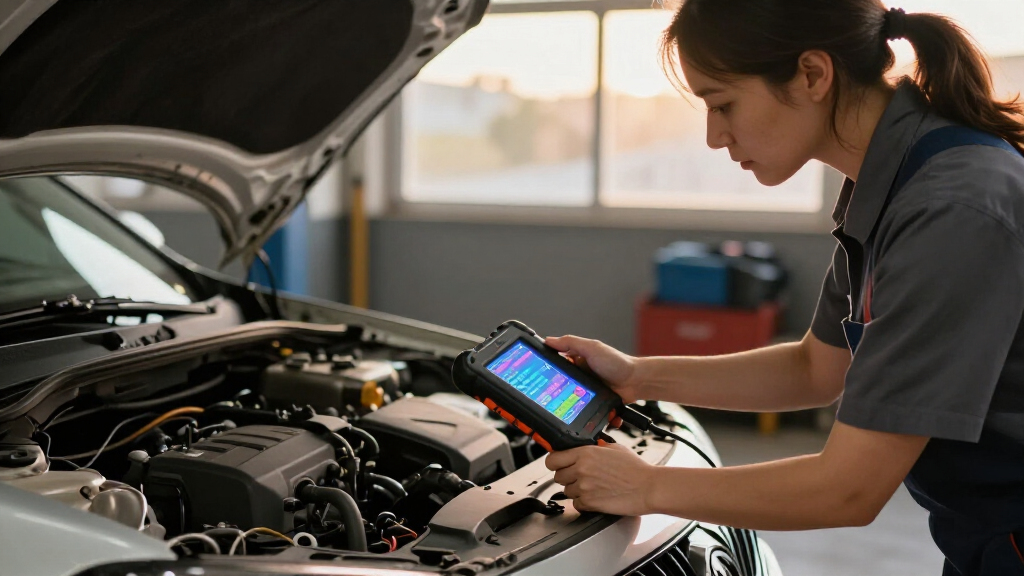

Car diagnostic scan tools range from simple check engine code readers to advanced units that can control vehicle systems and run service functions. My best overall pick is the Innova 5610 for buyers who want bidirectional controls and broad diagnostic capability, while the BlueDriver stands out for app-based diagnostics and the ANCEL AD310 for straightforward code reading. The main tradeoff is how much diagnostic depth you need versus the learning curve and vehicle compatibility you are willing to manage. A basic reader may answer a warning-light question, while ABS, SRS, live data, and reset functions call for broader coverage. Read on for how the 14 options compare and which type of tool fits your needs.

Get business pricing on garage and car supplies
- Business-only prices and quantity discounts
- Tax-exempt purchasing
- Multiple users, one account, clear invoices
Complete the kit


Key Takeaways
- The Innova 5610 leads for hands-on diagnosis: bidirectional controls offer more than code retrieval, though they suit owners comfortable with a more involved tool.
- BlueDriver makes app-based diagnostics its main distinction: it adds system coverage without requiring a dedicated handheld display, so phone-based workflows are a key fit decision.
- Basic readers still have a clear role: the ANCEL AD310, Autel MS309, and MOTOPOWER MP69033 focus on engine-code tasks rather than broad module diagnosis.
- Reset functions vary widely in usefulness: XTOOL D5S and MUCAR 632 Elite offer broader service and control features, but buyers should verify support for their exact vehicle before relying on a function.
- Vehicle coverage matters as much as the scanner label: ABS, SRS, transmission, and TPMS access differ across models, so a tool’s advertised capability should be checked against the make, model, year, and system.
| ZMOON ZM201 Professional OBD2 Scanner Diagnostic Tool |  | Best Color Display for Engine Diagnostics | Vehicle Compatibility: All vehicles after 1996 (US), 2002 (EU), 2008 (Asia) with OBD2 port | Protocols Supported: KWP2000, ISO9141, J1850 VPW, J1850 PWM, CAN | Display: 2.8-inch color screen with adjustable brightness | VIEW LATEST PRICE | See Our Full Breakdown |
| Innova 5210 OBD2 Scanner & Engine Code Reader |  | Best Multi-Function Value | Brand: Innova | Model: 5210 | Compatibility: Most US, Asian, and European vehicles from 1996+ | VIEW LATEST PRICE | See Our Full Breakdown |
| FIXD Bluetooth OBD2 Scanner |  | Best App-Based Pick for Non-Mechanics | Brand: FIXD | Model: 2 | Compatibility: 1996+ gasoline and hybrid vehicles; 2006+ diesel | VIEW LATEST PRICE | See Our Full Breakdown |
| Autel MS309 OBD2 Scanner Universal Car Engine Fault Code Reader |  | Best Budget Plug-and-Play | Compatibility: OBD II vehicles from 1996 onward (US) | Functions: Read/clear generic and manufacturer-specific codes, freeze frame, vehicle info, I/M readiness | Operation: Plug-and-play, no phone or setup needed | VIEW LATEST PRICE | See Our Full Breakdown |
| FOXWELL NT604 Elite Car OBD2 Scanner |  | Best for ABS, SRS, and Transmission Coverage | Compatibility: 60+ car brands worldwide | Supported Systems: ABS, SRS, engine, transmission | Data Features: Live data stream, DTC library, data playback | VIEW LATEST PRICE | See Our Full Breakdown |
| XTOOL D5S OBD2 Scanner with 16 Reset Functions |  | Best for Maintenance Resets | Reset Functions: 16 | Compatibility: Over 90 vehicle brands | Protocols Supported: CAN FD | VIEW LATEST PRICE | See Our Full Breakdown |
| BlueDriver OBD2 Bluetooth Scanner |  | Best App-Based Bluetooth Pick | Model: LSB2 | Compatibility: Gas vehicles 1996+ in North America | Supported Systems: Check Engine, ABS, SRS, Airbag, TPMS, Transmission | VIEW LATEST PRICE | See Our Full Breakdown |
| Innova 5610 OBD2 Bidirectional Scan Tool | 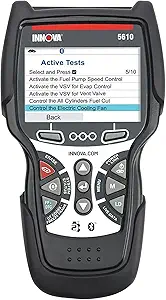 | Best Bidirectional Control | Model: 5610 | Type: Bidirectional scan tool | Compatibility: Most 1996–2023 vehicles (select makes/models) | VIEW LATEST PRICE | See Our Full Breakdown |
| ANCEL AD410 Enhanced OBD2 Scanner |  | Best Value Code Reader | Compatibility: 1996+ OBD2 vehicles, US, EU, Asian models | Display: 2.4-inch color screen | Protocols Supported: CAN, ISO9141, KWP2000, J1850 VPW, J1850 PWM | VIEW LATEST PRICE | See Our Full Breakdown |
| FOXWELL NT301 OBD2 Scanner Live Data Diagnostic Code Reader |  | Best for Beginners | Display: 2.8-inch color screen | Compatibility: Most 1996+ gasoline vehicles, light trucks, SUVs, and many 2000+ European and Asian models | Protocols Supported: KWP2000, J1850 VPW, ISO9141, J1850 PWM, CAN | VIEW LATEST PRICE | See Our Full Breakdown |
| VDIAGTOOL VD10 OBD2 Scanner Code Reader for Car Diagnostics |  | Best for Simple, Broad Compatibility | Protocols: CAN, ISO9141, KWP2000, J1850 PWM, J1850 VPW | Vehicle coverage: Post-1996 US, post-2006 EU, and post-2009 Asian vehicles | Display: Backlit 2-line LCD | VIEW LATEST PRICE | See Our Full Breakdown |
| MUCAR 632 Elite AI-Assisted Bidirectional OBD2 Scanner | 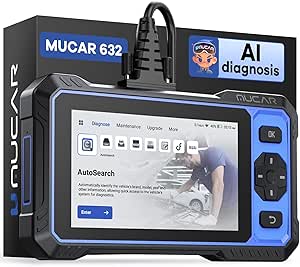 | Best for Advanced DIY Diagnostics | Display: 6.2-inch touchscreen, 1024 × 600 | Storage: 32GB, expandable to 128GB with a TF card | Processor: 1.8GHz chip | VIEW LATEST PRICE | See Our Full Breakdown |
| MOTOPOWER MP69033 Car OBD2 Scanner Code Reader Engine Fault Diagnostic Tool |  | Best for a Larger Basic Display | Protocols: 9 protocols | Display: 2.8-inch backlit LCD | Languages: English, German, Dutch, Spanish, French, Italian | VIEW LATEST PRICE | See Our Full Breakdown |
| ANCEL AD310 Classic Enhanced Universal OBD II Scanner Car Engine Fault Code Reader |  | Best Compact Basic Reader | Weight: 12 ounces | Dimensions: 8.9 × 6.9 × 1.4 inches | Cable length: 2.5 feet | VIEW LATEST PRICE | See Our Full Breakdown |
| car diagnostic scan tool | Compatibility | Connectivity | Functions |
|---|---|---|---|
| ZMOON ZM201 Professional OBD2 | — | Plug & play; Windows PC for data review | — |
| Innova 5210 OBD2 Scanner & Eng | Most US, Asian, and European vehicles from 1996+ | Bluetooth with companion repair app | OBD2 scanning, battery testing, live data, oil reset, smog check readiness |
| FIXD Bluetooth OBD2 Scanner | 1996+ gasoline and hybrid vehicles; 2006+ diesel | Bluetooth to iPhone/Android app | Code reading, repair suggestions, maintenance alerts |
| Autel MS309 OBD2 Scanner Unive | OBD II vehicles from 1996 onward (US) | — | Read/clear generic and manufacturer-specific codes, freeze frame, vehicle info, I/M readiness |
| FOXWELL NT604 Elite Car OBD2 S | 60+ car brands worldwide | OBDII port, plug-and-play | — |
| XTOOL D5S OBD2 Scanner with 16 | Over 90 vehicle brands | — | — |
| BlueDriver OBD2 Bluetooth Scan | Gas vehicles 1996+ in North America | Bluetooth | — |
| Innova 5610 OBD2 Bidirectional | Most 1996–2023 vehicles (select makes/models) | OBD2 cable plus RepairSolutions2 wireless app | — |
| ANCEL AD410 Enhanced OBD2 Scan | 1996+ OBD2 vehicles, US, EU, Asian models | — | Read/clear codes, live data, freeze frame, I/M readiness, O2 sensor test, EVAP test, MIL status |
| FOXWELL NT301 OBD2 Scanner Liv | Most 1996+ gasoline vehicles, light trucks, SUVs, and many 2000+ European and Asian models | — | — |
| VDIAGTOOL VD10 OBD2 Scanner Co | — | — | — |
| MUCAR 632 Elite AI-Assisted Bi | — | WiFi and automatic VIN scanning | Bidirectional control, ECU coding, real-time data, remote assistance, and 15+ reset services |
| MOTOPOWER MP69033 Car OBD2 Sca | — | — | Read and clear engine codes, freeze frame, vehicle information, and real-time data |
| ANCEL AD310 Classic Enhanced U | — | — | Reads and clears trouble codes and displays live data |
More Details on Our Top Picks
ZMOON ZM201 Professional OBD2 Scanner Diagnostic Tool
The ZMOON ZM201 stands out for its 2.8-inch adjustable color screen, which makes reading live data and freeze frames far less squint-inducing than the monochrome displays on budget rivals like the MOTOPOWER MP69033. Where it beats similarly priced handhelds is presentation: shortcut keys and brightness control mean you can actually use it in a sunlit driveway. Compared with the ANCEL AD310, a classic no-frills code reader, the ZM201 adds live data graphing, O2 sensor testing, and an EVAP system check — real diagnostics rather than just code retrieval. The tradeoff is honest but real: this is an engine-only tool. If your ABS or airbag warning light is on, the FOXWELL NT604 Elite covers those systems for not much more effort. Data review also requires a Windows PC, so Mac households are out of luck.
Pros:- Adjustable color display that’s readable in bright conditions
- Live data, freeze frame, O2 sensor, and EVAP checks beyond basic code reading
- Wide compatibility with all post-1996 US vehicles
- Lifetime free software updates with a 3-year warranty
Cons:- Engine diagnostics only — no ABS, SRS, or transmission access
- PC data review limited to Windows, no Mac support
Best for: DIY owners who want clear, readable engine diagnostics and live data without paying for full-system coverage
Not ideal for: Anyone troubleshooting ABS, SRS, or transmission warnings — this tool physically cannot read those systems
- Vehicle Compatibility:All vehicles after 1996 (US), 2002 (EU), 2008 (Asia) with OBD2 port
- Protocols Supported:KWP2000, ISO9141, J1850 VPW, J1850 PWM, CAN
- Display:2.8-inch color screen with adjustable brightness
- Power Source:Powered directly from OBDII port
- Data Features:Read/clear codes, live data, freeze frame, O2 sensor test, EVAP system check
- Connectivity:Plug & play; Windows PC for data review
- Warranty:3 years
Our verdict“A smart middle ground for home mechanics who want readable live engine data but don’t need full-system scanning.”
Innova 5210 OBD2 Scanner & Engine Code Reader
What separates the Innova 5210 from single-purpose readers is the battery testing and oil reset bundled alongside standard OBD2 functions. That combination usually requires stepping up to pricier service tools, so a buyer who performs their own oil changes and wants battery health checks gets genuine utility here. Compared with the Autel MS309, the 5210 pulls ahead on breadth — the MS309 only reads and clears engine codes — though the MS309 is simpler for pure code checks. The 5210’s Bluetooth link to Innova’s repair app, with verified fixes and no subscription, gives it an advisory layer the FIXD charges into its ecosystem differently. The catch: full functionality leans on the smartphone app, and ABS coverage varies by manufacturer, so verify your model before assuming airbag or brake codes will appear.
Pros:- Combines code reading, battery testing, live data, and oil reset in one tool
- Free repair-guidance app with verified fixes and no subscription
- Covers most US, Asian, and European vehicles from 1996 onward
- Built-in smog check readiness for emissions testing prep
Cons:- ABS code coverage is inconsistent across vehicle makes
- Requires the smartphone app for full functionality
Best for: Hands-on owners who do their own maintenance and want battery testing, oil reset, and repair guidance in one device
Not ideal for: Buyers wanting a standalone tool — core functions depend on pairing with the smartphone app
- Brand:Innova
- Model:5210
- Compatibility:Most US, Asian, and European vehicles from 1996+
- Functions:OBD2 scanning, battery testing, live data, oil reset, smog check readiness
- Connectivity:Bluetooth with companion repair app
- Included Components:Code reader with OBD2 cable, quick start guide
Our verdict“The most complete maintenance companion in the entry-level tier, as long as your phone is part of the workflow.”
FIXD Bluetooth OBD2 Scanner
The FIXD takes a different approach from every handheld here: it’s a tiny plug-in dongle that stays hidden under the dash and pushes everything to your phone. For someone who never wants to interpret a code themselves, its plain-English explanations and maintenance alerts translate cryptic fault codes into decisions — a friendliness level the Autel MS309 or ANCEL AD410 don’t attempt. Compared with the BlueDriver, another Bluetooth option, FIXD wins on simplicity but gives up BlueDriver’s ABS, SRS, and TPMS depth. The tradeoffs are structural: it’s useless without a compatible smartphone, coverage stops at OBD2-supported vehicles, and warranty terms go unspecified — unusual next to the ZMOON’s three years. Think of it as a translator, not a mechanic’s tool.
Pros:- Wireless smartphone-based diagnostics with no cable clutter
- Plain-language code explanations and repair cost estimates
- Maintenance alerts help non-mechanics stay ahead of problems
- Compact enough to leave permanently plugged in under the dash
Cons:- Completely dependent on a compatible iPhone or Android device
- No specified warranty coverage
Best for: Drivers who want plain-English explanations and proactive maintenance alerts on their phone, with zero technical learning curve
Not ideal for: Serious DIYers — no live bidirectional work, no ABS/SRS access, and no standalone operation without a phone
- Brand:FIXD
- Model:2
- Compatibility:1996+ gasoline and hybrid vehicles; 2006+ diesel
- Connectivity:Bluetooth to iPhone/Android app
- Functions:Code reading, repair suggestions, maintenance alerts
- Weight:27.22 g
- Warranty:Not specified
Our verdict“The gentlest entry point into car diagnostics for people who just want to know what a warning light means.”
Autel MS309 OBD2 Scanner Universal Car Engine Fault Code Reader
The Autel MS309 earns its spot by doing the fundamentals cleanly: plug it in, read the code, clear it, check I/M readiness before a smog test. No phone pairing, no account setup, no learning curve — a refreshing contrast to the app-dependent FIXD or the Innova 5210, both of which lean on a smartphone for their best features. Against the FOXWELL NT301, a close budget rival, the MS309 holds its own on generic and manufacturer-specific code retrieval plus freeze frame data. The limitations define it, though: no TPMS, no service functions, no system coverage beyond the engine, and post-2017 FCA vehicles are locked out by security restrictions. If a check engine light is your entire problem, this is enough tool. Anything more and you’ll outgrow it fast.
Pros:- Genuine plug-and-play operation with no setup or phone required
- Reads both generic and manufacturer-specific codes plus freeze frame data
- I/M readiness check is genuinely useful before emissions testing
- Lifetime technical support included
Cons:- Strictly basic OBDII — no TPMS, service resets, or advanced diagnostics
- Cannot read post-2017 FCA vehicles due to security restrictions
Best for: First-time scanner buyers and pre-emissions-test checkers who just need reliable engine code reads
Not ideal for: Owners of post-2017 FCA vehicles (Chrysler, Dodge, Jeep) or anyone needing ABS/SRS/TPMS access
- Compatibility:OBD II vehicles from 1996 onward (US)
- Functions:Read/clear generic and manufacturer-specific codes, freeze frame, vehicle info, I/M readiness
- Operation:Plug-and-play, no phone or setup needed
- Limitations:Basic OBDII only; no TPMS or advanced diagnostics
- FCA Restriction:No code access for post-2017 FCA vehicles
- Warranty:12 months with lifetime technical support
Our verdict“The simplest, most dependable way to answer ‘why is my check engine light on’ without spending more.”
FOXWELL NT604 Elite Car OBD2 Scanner
This is where the FOXWELL NT604 Elite justifies its place: it scans four systems — engine, transmission, ABS, and SRS — which most sub-$100 handhelds simply cannot touch. If your airbag or traction control light is on, the ZMOON ZM201 and Autel MS309 are blind, and the NT604 is the cheapest credible answer in this lineup. It also brings live data streaming, a built-in DTC library, data playback, and a rugged carrying case, with lifetime free updates across 60+ brands. The gap between it and the tier above — the XTOOL D5S with 16 reset functions — is service work: the NT604 cannot perform resets or relearns, so oil service lights and throttle relearns remain out of reach. AUTOVIN also stumbles on some older models, so check compatibility before buying.
Pros:- Diagnoses engine, transmission, ABS, and SRS from one device
- Supports 60+ car brands with lifetime free updates
- Live data stream, DTC library, and data playback included
- Ships in a durable hard carrying case with no recurring software fees
Cons:- No reset or relearn service functions whatsoever
- AUTOVIN fails on some older or less common vehicle brands
Best for: Owners chasing ABS, airbag, or transmission warning lights who want multi-system diagnosis without professional-tool pricing
Not ideal for: Anyone needing service functions like oil resets or throttle relearns — this tool diagnoses but does not reset
- Compatibility:60+ car brands worldwide
- Supported Systems:ABS, SRS, engine, transmission
- Data Features:Live data stream, DTC library, data playback
- Connectivity:OBDII port, plug-and-play
- Updates:Lifetime free updates, no software fees
- Case:Solid protective KO plastic carrying case
- Limitations:No reset or relearn functions
Our verdict“The most system coverage you can get at this tier — buy it for diagnosis, not for service resets.”
XTOOL D5S OBD2 Scanner with 16 Reset Functions
The XTOOL D5S stands out for its 16 reset functions — EPB, SAS, BMS, TPMS and more — which is service capability that basic code readers like the ANCEL AD410 simply don’t offer. If you do your own brake jobs or battery replacements, those resets aren’t a luxury; they’re the difference between finishing a job and being stuck at the last step. Compared with the Innova 5610, the D5S covers a broader brand range (90+) and includes WiFi updates without a subscription. The tradeoff is complexity: some vehicle-specific functions may demand more technical knowledge than a casual DIYer has, and coverage varies by make, so checking compatibility first is a must. It’s a mid-tier service tool, not a full professional bidirectional platform.
Pros:- 16 reset functions including EPB, SAS, BMS, and TPMS
- Covers over 90 vehicle brands across cars and 12V trucks
- Accesses engine, ABS, SRS, and transmission systems
- WiFi updates with no subscription fees
Cons:- Some vehicle functions may require professional assistance
- Compatibility must be verified before purchase
- No support for Indian domestic vehicle brands
Best for: DIY mechanics who perform their own maintenance and need service resets after brake, battery, or steering work
Not ideal for: Drivers who only want to read a check engine light — its reset functions will sit unused and a cheaper reader will do the job
- Reset Functions:16
- Compatibility:Over 90 vehicle brands
- Protocols Supported:CAN FD
- Vehicle Type:Cars and 12V trucks
- System Access:Engine, ABS, SRS, Transmission
- Update Method:WiFi
- Subscription:None
Our verdict“Buy this if you service your own vehicles and need reset capability; skip it if you only read the occasional fault code.”
BlueDriver OBD2 Bluetooth Scanner
Where plug-in handhelds like the FOXWELL NT301 keep everything on a small screen, the BlueDriver moves diagnostics to your phone — and that changes the experience. Live data, ABS/SRS/TPMS codes, and technician-verified repair reports render on a full-size display, which makes interpreting live sensor streams far easier than squinting at a 2.8-inch panel. Compared with the FIXD, BlueDriver covers more systems and includes enhanced diagnostics with a one-time purchase and no subscription. The tradeoffs are real though: it’s limited to gas vehicles in North America, it depends entirely on having a compatible phone or tablet, and diesel owners are out of luck. Compared with handhelds, there’s also no standalone operation if your phone battery dies mid-diagnosis.
Pros:- Wireless Bluetooth connection with no cables to manage
- Covers check engine, ABS, SRS, airbag, TPMS, and transmission
- No subscription — full access with one purchase
- Technician-verified repair reports and live data monitoring
Cons:- Limited to gas-powered vehicles in North America
- Requires a compatible smartphone or tablet to function
- No support for older or diesel vehicles
Best for: Smartphone-comfortable drivers who want enhanced ABS, SRS, and transmission diagnostics with repair guidance on a big screen
Not ideal for: Diesel owners or anyone who prefers a self-contained tool that works without a phone
- Model:LSB2
- Compatibility:Gas vehicles 1996+ in North America
- Supported Systems:Check Engine, ABS, SRS, Airbag, TPMS, Transmission
- Connectivity:Bluetooth
- Weight:2.08 ounces
- Warranty:180-day money-back guarantee, 1-year defect coverage
Our verdict“This pick makes the most sense for phone-first drivers who want subscription-free enhanced diagnostics; handheld fans and diesel owners should look elsewhere.”
Innova 5610 OBD2 Bidirectional Scan Tool
The Innova 5610 earns its place with bidirectional control — the ability to send commands to vehicle systems, not just read them — which none of the entry-level readers in this roundup, like the ANCEL AD410 or FOXWELL NT301, can do. That means you can actively test components instead of guessing from fault codes, a genuine time-saver for serious diagnosis. Pairing with the RepairSolutions2 app adds repair suggestions and wireless convenience, and free updates with ASE-certified support back the hardware. The tradeoffs: it isn’t universal, with coverage limited to select 1996–2023 makes and models, and app features depend on an internet connection. Compared with the XTOOL D5S, you gain command control but give up some of its breadth of maintenance resets.
Pros:- Bidirectional controls for active system testing
- Real-time data plus advanced reset functions
- Multilingual support and wireless app connectivity
- ASE-certified support and free updates
Cons:- Compatible only with select vehicle makes and models
- App features require an internet connection
- Not a universal scanner across all vehicles
Best for: Hands-on diagnosticians who want to actively test components rather than just read codes
Not ideal for: Owners of vehicles outside its supported coverage list, or anyone wanting a universal scanner
- Model:5610
- Type:Bidirectional scan tool
- Compatibility:Most 1996–2023 vehicles (select makes/models)
- Connectivity:OBD2 cable plus RepairSolutions2 wireless app
- Weight:1.3 pounds
- Includes:Code reader with protective boot, manual, OBD2 cable, soft pouch, USB cable
Our verdict“Choose this if you want to command and test vehicle systems, not just decode them — just verify your vehicle is supported first.”
ANCEL AD410 Enhanced OBD2 Scanner
The ANCEL AD410 hits the sweet spot between the bare-bones MOTOPOWER MP69033 and pricier multi-system tools: a 2.4-inch color screen, live data, freeze frame, I/M readiness, and O2/EVAP testing, all without apps, batteries, or pairing. That plug-and-play simplicity is the point — it works the same way whether your phone is charged or not. The key tradeoff versus the FOXWELL NT301 is that the AD410 sticks strictly to engine and emissions codes, so ABS, SRS, and transmission faults are invisible to it. The screen is also on the small side for graphing live data. Still, for the most common job — figuring out why the check engine light is on — it covers everything most drivers actually need at a lower tier of complexity and cost than mid-range tools.
Pros:- No app, batteries, or pairing required — fully plug and play
- Wide protocol and vehicle coverage for 1996+ US, EU, and Asian models
- Detailed live data, freeze frame, O2, and EVAP testing
- Free lifetime software updates
Cons:- Engine and emissions codes only — no ABS or transmission functions
- Small display can be awkward for reviewing live data
- Compatibility check recommended before purchase
Best for: Budget-conscious drivers who want reliable engine and emissions diagnostics with zero setup
Not ideal for: Anyone needing ABS, SRS, or transmission diagnostics — this tool reads engine codes only
- Compatibility:1996+ OBD2 vehicles, US, EU, Asian models
- Display:2.4-inch color screen
- Protocols Supported:CAN, ISO9141, KWP2000, J1850 VPW, J1850 PWM
- Power:Powered via vehicle’s OBD2 port
- Functions:Read/clear codes, live data, freeze frame, I/M readiness, O2 sensor test, EVAP test, MIL status
- Updates:Free software updates
Our verdict“A dependable, app-free choice for check-engine-light diagnostics at a value price — just don’t expect system coverage beyond the engine.”
FOXWELL NT301 OBD2 Scanner Live Data Diagnostic Code Reader
The FOXWELL NT301 is the tool I’d hand to someone diagnosing their first check engine light. It’s plug and play with no setup, charging, or app required, and its 2.8-inch screen with live data graphing makes it slightly easier to read than the ANCEL AD410‘s smaller display — plus it covers diesel vehicles, which the AD410 and the BlueDriver don’t. Compared with the Autel MS309, the NT301’s graphing mode gives you a visual read on sensor behavior rather than raw numbers. The limitations are the same as most entry readers: it’s engine-only, so ABS and transmission codes are off the table, and the screen can wash out in direct sunlight. For straightforward fault reading and emissions checks, though, it does the job without any learning curve.
Pros:- Plug and play — no charging, setup, or app needed
- Live data graphing and advanced OBDII modes
- Covers gasoline and diesel vehicles plus many 2000+ European and Asian models
- Lifetime free updates
Cons:- Engine diagnostics only — no ABS or transmission functions
- Screen can be hard to read in bright sunlight
- Lacks advanced features of higher-end scanners
Best for: First-time DIYers who want a no-setup tool to read, clear, and graph engine codes — including on diesel vehicles
Not ideal for: Users chasing ABS, SRS, or transmission faults, or anyone who needs advanced service functions
- Display:2.8-inch color screen
- Compatibility:Most 1996+ gasoline vehicles, light trucks, SUVs, and many 2000+ European and Asian models
- Protocols Supported:KWP2000, J1850 VPW, ISO9141, J1850 PWM, CAN
- Features:Live data graphing, I/M readiness, EVAP testing, O2 sensor testing, data logging
- Power:Plug & Play via OBD2 port
- Updates:Lifetime free updates
- Warranty:1-year seller assurance
Our verdict“The easiest entry point into car diagnostics for beginners and casual DIYers, as long as engine codes are all you need.”
VDIAGTOOL VD10 OBD2 Scanner Code Reader for Car Diagnostics
The VDIAGTOOL VD10 suits owners who want a straightforward way to check engine codes across a range of older and newer OBDII vehicles. Its coverage of five OBDII protocol families helps it work with many eligible US, EU, and Asian vehicles, while freeze frame and live data give more context than a code alone. Compared with the MOTOPOWER MP69033, it shares a basic, vehicle-powered design but adds vehicle information retrieval and a longer stated warranty. Its 2-line display keeps the interface simple, though it provides less room for data than the MOTOPOWER’s 2.8-inch screen or the larger MUCAR 632 Elite. This is an engine-focused reader: it does not offer the advanced system access or bidirectional controls of higher-featured tools.
Pros:- Supports five OBDII protocol families for broad compatibility among eligible vehicles
- Reads live data, freeze-frame data, and vehicle information
- Simple plug-and-play operation with a backlit display
- Includes a stated five-year warranty
Cons:- Limited to OBDII-compatible vehicles from the stated model-year ranges
- Two-line display is less suited to reviewing detailed data than larger-screen scanners
- Draws power from the vehicle, so it cannot operate independently
Best for: DIY owners of OBDII-compatible cars who want a simple, multilingual engine-code reader with freeze-frame data.
Not ideal for: Owners who need ABS, airbag, transmission, or other system diagnostics, or who want a large screen for viewing live data.
- Protocols:CAN, ISO9141, KWP2000, J1850 PWM, J1850 VPW
- Vehicle coverage:Post-1996 US, post-2006 EU, and post-2009 Asian vehicles
- Display:Backlit 2-line LCD
- Power:Powered through the OBD2 port
- Languages:English, French, German, Spanish, Italian, Russian
- Warranty:5 years
Our verdict“Choose the VD10 for uncomplicated engine diagnostics across many OBDII vehicles; skip it if you need deeper system coverage or a more capable display.”
MUCAR 632 Elite AI-Assisted Bidirectional OBD2 Scanner
The MUCAR 632 Elite is the most feature-rich choice in this group, aimed at owners ready to go beyond reading and clearing engine codes. Its bidirectional control can send commands to supported vehicle systems, while ECU coding, real-time data, and more than 15 listed reset services give it broader diagnostic reach than the ANCEL AD310 or VDIAGTOOL VD10. The 6.2-inch touchscreen and WiFi make that larger workflow easier to navigate, and lifetime free software updates are a useful distinction for a tool designed for ongoing use. The tradeoff is complexity: its functions depend on vehicle compatibility, AI assistance needs an internet connection, and FCA AutoAuth registration is required separately. It makes more sense for technically confident DIYers than for someone seeking a basic check-engine reader.
Pros:- Bidirectional controls and ECU coding offer functions beyond basic code reading
- Includes more than 15 listed reset services
- Large touchscreen, WiFi, and automatic VIN scanning support a more capable workflow
- Lifetime free software updates are stated
Cons:- Vehicle compatibility must be checked because advanced functions vary by vehicle
- AI-assisted features require an internet connection
- FCA AutoAuth registration is a separate requirement
Best for: Experienced DIY mechanics who want bidirectional tests, supported ECU coding, and a wide range of reset services in one scanner.
Not ideal for: Drivers who only need to read engine codes, prefer a simple plug-in reader, or lack reliable internet for AI features.
- Display:6.2-inch touchscreen, 1024 × 600
- Storage:32GB, expandable to 128GB with a TF card
- Processor:1.8GHz chip
- Operating system:Android 8.1
- Connectivity:WiFi and automatic VIN scanning
- Protocols:FCA SGW, CAN FD
- Vehicle coverage:1996 to latest models; check vehicle compatibility
- Functions:Bidirectional control, ECU coding, real-time data, remote assistance, and 15+ reset services
- Updates:Lifetime free software updates
Our verdict“Pick the MUCAR 632 Elite if you will use its advanced controls and service functions; a simpler scanner is a better fit for occasional engine-code checks.”
MOTOPOWER MP69033 Car OBD2 Scanner Code Reader Engine Fault Diagnostic Tool
The MOTOPOWER MP69033 keeps engine diagnostics simple but gives readouts more room than the VDIAGTOOL VD10: its 2.8-inch backlit LCD is easier to scan than a two-line display. It covers common OBDII tasks, including reading and clearing engine codes, viewing freeze-frame information, and monitoring real-time data. That makes it a practical step up in screen size for drivers who still want a dedicated, button-operated reader rather than the touchscreen complexity of the MUCAR 632 Elite. Its limits are clear, though: it does not handle ABS, airbag, or oil-service codes, and live data requires the vehicle to be running. Since it draws power from the OBDII port, it is intended for use at the car rather than as a standalone device.
Pros:- 2.8-inch backlit display provides more viewing space than the VD10’s two-line LCD
- Reads and clears engine codes and displays freeze-frame and real-time data
- Supports nine protocols and six listed languages
- Powered through the vehicle’s OBDII port
Cons:- Does not read or clear ABS, airbag, or oil-service codes
- Live data requires the engine to be running
- Requires an OBDII connection and is not a standalone diagnostic device
Best for: Drivers with a 1996-or-newer OBDII vehicle who want a straightforward engine reader with a screen larger than a basic two-line LCD.
Not ideal for: Owners diagnosing ABS, airbag, or oil-service warnings, or those who need access to systems beyond OBDII engine functions.
- Protocols:9 protocols
- Display:2.8-inch backlit LCD
- Languages:English, German, Dutch, Spanish, French, Italian
- Cable length:2.5 feet
- Vehicle coverage:Most 1996-and-newer OBDII and CAN vehicles
- Power:Powered through the vehicle’s OBDII port
- Functions:Read and clear engine codes, freeze frame, vehicle information, and real-time data
- System limitation:Does not support ABS, airbag, or oil-service light diagnostics
Our verdict“Choose the MP69033 for clear, basic engine-code checks on a larger screen, but look to a broader scanner for non-engine systems.”
ANCEL AD310 Classic Enhanced Universal OBD II Scanner Car Engine Fault Code Reader
The ANCEL AD310 is a compact choice for drivers who want a dedicated tool for basic engine diagnostics without moving to a tablet-style scanner. It supports the five common OBDII protocols listed and covers the stated range of US, EU, and Asian cars and light trucks, so it can suit a household vehicle toolkit. Compared with the MOTOPOWER MP69033, the AD310 has a similar 2.5-foot cable but emphasizes portability, with a stated weight of 12 ounces and dimensions under nine inches long. Both remain limited to engine-focused OBDII checks; neither replaces the wider system access of the MUCAR 632 Elite. The AD310 also requires an OBDII vehicle and does not diagnose ABS, SRS, or transmission systems, so its compact form comes with a deliberately narrow scope.
Pros:- Compact stated dimensions and 12-ounce weight make it easy to store or carry
- Supports five OBDII protocols
- Includes a 2.5-foot cable
- Covers the stated range of compatible cars, light trucks, and SUVs
Cons:- Limited to engine and emission-related diagnostics
- Does not test ABS, SRS, or transmission systems
- Requires a vehicle with an OBDII interface and does not support OBDI vehicles
Best for: Drivers who want a lightweight, portable scanner for basic engine-code checks on a compatible OBDII car, light truck, or SUV.
Not ideal for: Owners who need ABS, SRS, or transmission diagnostics, or who want a tool for OBDI vehicles.
- Weight:12 ounces
- Dimensions:8.9 × 6.9 × 1.4 inches
- Cable length:2.5 feet
- Protocols:KWP2000, J1850 VPW, ISO9141, J1850 PWM, CAN
- Vehicle compatibility:1996+ US, 2000+ EU, and Asian cars, light trucks, and SUVs
- Functions:Reads and clears trouble codes and displays live data
- System limitation:Engine diagnostics only; no ABS/SRS or transmission testing
Our verdict“The AD310 fits drivers who value a portable basic engine reader, while owners needing diagnostics beyond the engine should choose a broader scanner.”
How We Picked
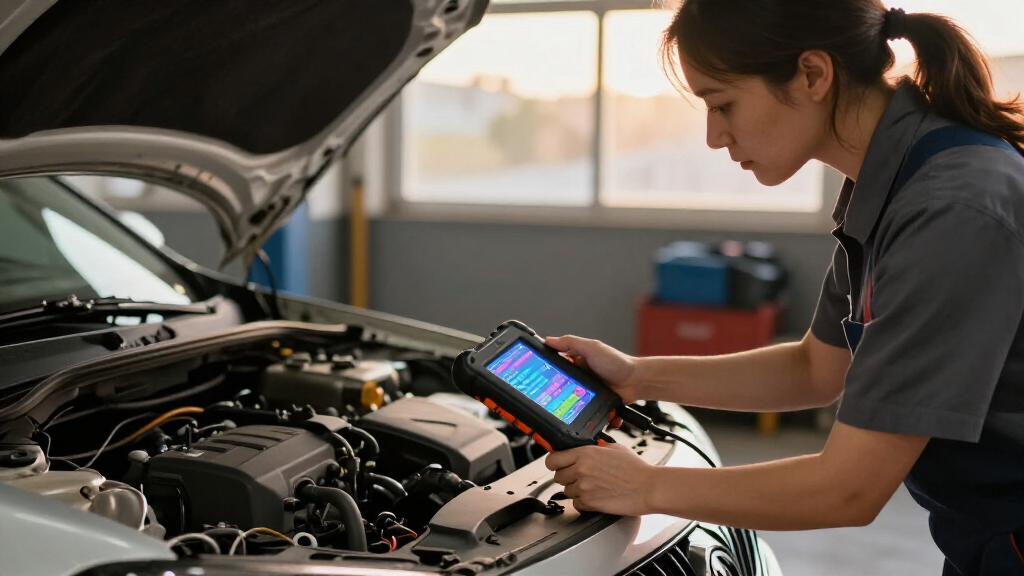
I ranked these car diagnostic scan tools by how well their capabilities match common DIY repair decisions: reading and clearing codes, viewing live data, checking additional modules, and performing service or bidirectional functions. I also weighed interface style, setup demands, portability, and whether the tool depends on a phone or app. A scanner earns a higher position when it provides useful diagnostic depth without making everyday tasks unnecessarily difficult.
The order reflects differences in scope, not a claim that every feature works on every vehicle. The Innova 5610 ranks first for its bidirectional approach; BlueDriver and the MUCAR 632 Elite appeal to buyers seeking wider system access through different workflows. More focused engine readers rank lower for capability but can be the better match when a buyer only needs to investigate a check engine light. Before choosing, confirm compatibility for the vehicle and specific systems you want to scan.
Factors to Consider When Choosing Car Diagnostic Scan Tools
Choosing a scanner starts with the job you expect it to do. These broader checks help prevent paying for advanced functions you cannot use—or buying a basic reader that cannot answer the question behind your warning light.
Match System Coverage to the Warning
A check engine light usually points you toward powertrain codes, but an ABS or airbag warning can require access to a separate module. Many entry-level readers concentrate on engine diagnostics, even when their packaging uses broad language about car diagnosis. Before buying, identify the systems you want to read and confirm that the scanner supports those systems on your vehicle. Coverage can vary by make, model, year, and sometimes trim. If you only need engine codes, paying for every module may add complexity without helping your routine. If you plan to handle safety-system warnings, a basic engine-only tool may leave you without the information you need.
Decide Whether Reading Codes Is Enough
Code reading identifies a fault reported by the vehicle; it does not confirm which part needs replacement. Live data can show changing sensor readings and help you judge whether a code fits the symptoms. Freeze-frame data preserves conditions recorded when a fault appeared, which can be useful for intermittent problems. Bidirectional controls go a step further by letting a scanner command supported components or functions. Those controls can help with troubleshooting, but they also demand more knowledge and vehicle-specific support. For occasional warning-light checks, a simple reader may be easier to use and interpret.
Check Vehicle Compatibility Before Counting Features
OBD2 compatibility does not mean every tool can access every system or service function on every car. A feature may work on one model year and be unavailable on another, even within the same brand. Check the manufacturer’s coverage information using the exact year, make, and model, and look for confirmation of the specific function you want. Pay close attention to regional versions and whether the vehicle uses the relevant protocol or module support. Treat broad claims such as “most vehicles” as a starting point for verification. This check is especially useful before choosing a scanner for resets, ABS bleeding, or bidirectional tests.
Choose a Workflow You Will Actually Use
Handheld scanners keep the display and controls in one device, while Bluetooth models rely on a phone or tablet. A handheld can be convenient in a garage where you want to read data without pairing or opening an app. A phone-based tool may make charts and saved reports easier to review, but it depends on compatible hardware, software, and a working connection. Consider who will use the scanner and whether a small screen or app workflow is more comfortable. Also check what happens when the phone operating system changes or the app is updated. The best interface is the one that lets you review diagnostic information clearly when you need it.
Separate Service Resets from Repair Diagnostics
Oil and maintenance resets can be convenient, but they do not diagnose why a warning appeared. A reset tool may clear a reminder while leaving the underlying repair unfinished. Before choosing a scanner for service work, list the specific procedures you want to perform and confirm vehicle support for each one. Some functions require a maintenance procedure or special conditions before the tool can run them. Buyers who want to diagnose faults should prioritize code details and live data; buyers handling routine servicing may value supported resets more. Avoid treating a long feature list as proof that every function applies to your car.
Think About Updates and Long-Term Use
Diagnostic tools depend on software that reflects vehicle coverage and changing model years. Find out how updates are delivered, whether an account or app is required, and whether any functions depend on ongoing access. A scanner bought for one older car has different long-term needs from one intended to follow several newer vehicles. Consider whether you need stored reports, multiple user profiles, or coverage for cars you may own later. A more capable tool can serve a wider range of jobs, but only if you can keep it current and understand its interface. Simpler tools can remain a sensible choice when your needs are stable and limited to basic engine checks.
Frequently Asked Questions
Will an OBD2 scanner tell me exactly which part to replace?
No. A diagnostic trouble code describes a condition the vehicle detected, and several faults can produce similar codes. Use the code as a starting point, then compare it with symptoms, live data, and the vehicle’s service information. Replacing a part based on a code name alone can miss wiring, vacuum, or connection problems. More advanced data can narrow the possibilities, but it does not replace diagnosis.
Can a basic scanner read ABS or airbag faults?
Many basic readers focus on engine and emissions codes, so they may not communicate with ABS or SRS modules. A scanner needs explicit support for the system and your particular vehicle to retrieve those faults. Check coverage by year, make, and model before buying, rather than relying on the phrase “all system” or “professional.” If a safety-system warning is active, choose a tool confirmed to read that module or arrange a qualified diagnostic check.
Should I choose a Bluetooth scanner or a handheld unit?
Choose based on the workflow you prefer and the diagnostic information you need to review. Bluetooth scanners use a phone app, which can be helpful for charts and reports, but pairing and app compatibility become part of the process. Handheld units keep controls and display together, which can make quick checks more direct. Neither format guarantees broader system coverage, so compare supported modules and functions separately. If you share the tool with someone who dislikes phone-based setup, a handheld may be the more practical fit.
Is bidirectional control worth getting for home repairs?
It can be useful when you need to command a supported component or run a guided test, rather than only read what the car has reported. The value depends on your repair plans, technical comfort, and whether the scanner supports those controls on your vehicle. It does not make a scanner universally compatible, and some procedures have specific prerequisites. For occasional check engine light checks, bidirectional features may go unused. DIY owners who troubleshoot several systems may get more from them.
Can I clear a warning light with a scanner and keep driving?
A scanner can clear some stored codes, but clearing a code does not repair its cause. The light may return once the vehicle detects the same fault, and clearing codes can erase useful diagnostic information or reset readiness monitors. Record the code and relevant data before clearing anything. If the warning relates to brakes, airbags, overheating, or another safety concern, do not treat a cleared light as proof the vehicle is safe. Follow the vehicle manual or seek a repair diagnosis when symptoms persist.
Conclusion
For the best overall balance of diagnostic depth and control, choose the Innova 5610. Buyers who want a phone-centered workflow with broader diagnostic access should look at BlueDriver, while the XTOOL D5S or MUCAR 632 Elite fit owners seeking more service and bidirectional functions after verifying vehicle support. For beginners and routine engine-code checks, the ANCEL AD310 keeps the task focused; the VDIAGTOOL VD10 and Autel MS309 are also straightforward options. The Innova 5210 offers a middle ground for buyers interested in live data and battery testing. Pick by the systems and functions your car supports, then choose the interface you will be comfortable using.
Halloween Picks
halloween
As an affiliate, we earn on qualifying purchases.